Sunday, December 26, 2010

Flying and Tech

Flying and Tech
- by David Matthews 2

Over the past ten years, there have been two things that have been on the steady increase… airport security and personal technology.

Airport security has had to go on the increase because of the ever-present fear of terrorism. This has required passengers to be inconvenienced as they take off their shoes, their coats, their belts, and also take special considerations to make sure that their personal technology doesn’t get damaged from those same enhanced security measures.

Quite recently, this author had to take a trip to Oklahoma City to visit with a radio station that I work with. Having been taken to the airport extremely early to avoid hassles with security and the various check-in times, not to mention having my return flight delayed six hours due to weather, I had the opportunity to check out some of the provisions that the airports in Atlanta and Oklahoma City have for personal technology. The two airports that I visited were Hartsfield-Jackson International Airport in Atlanta, and the Will Rogers Airport in Oklahoma City. (Fortunately these were both direct flights, so there were no layovers.)

Security

As far as security goes, despite the media hype about pat-downs and body scanning, both airports I visited were using enhanced device-detection equipment, but not the “see through your clothes” scanners. This still required the removal of your coat and shoes, but it also meant removing my belt, watch, ring, and emptying my pockets of everything, even my wallet, pocket change, and plastic comb.

Most of the equipment I brought with me was in my computer carrying case or in my pocket. This consisted of my laptop computer, cellphone, Bluetooth earpiece, and a thumb drive for my data. Additional equipment, such as my plug-in electric razor and the chargers for my cellphone and earpiece, were checked in with my luggage.

When going through the security line, they provide a series of plastic bins for you to put in all of the items that have to be screen separately. Sensitive equipment like laptops and cellphones are not scanned for obvious reasons, and you are required to take your laptop out of the case. A good suggestion for travelers is to put all of your sensitive equipment (including thumb drives) in the same bin to keep them all together. Make sure this is the very first bin (or bins) scanned. And make sure you keep an eye on it after you go through it yourself to make sure that you recover everything you scanned. Due to the large volume of people that have to go through the system, it is very easy to forget something in the rush, and in both flights I heard announcements of personal belongings left behind.

Unfortunately, while both airports made accommodations for the large volume going INTO the security screening area, they fell painfully short in providing accommodations for passengers LEAVING the same area.

WiFi Access

Both airports offered wireless network access for “convenience”. While this sounds like a good service for people with laptops, when I searched the networks at Will Rogers Airport, it was listed as “unsecured”. This is not good for Internet users, and in fact some recent news stories have suggested that hackers have been taking advantage of airports providing this service to go after your personal laptop information.

Unfortunately any kind of security improvements that would make this service usable could easily be countermanded by the quest to keep the airport “safe”. So it is best to not take them up on this offer.

Kiosk Service

Another service that I saw at both airports was a kiosk for Internet access. This wouldn’t be too bad for a quick access for news or sports scores, but when it comes to personal email, even web-based email services, this would be extremely risky.

First, there is no way to make sure that your personal information wouldn’t be collected, and one should presume that with a public service like this, there would be NO privacy whatsoever.

Second, these kiosks aren’t free. They do want you to pay for the service, which means putting in your credit or debit card in there, and that is risky as well. Besides, most airports have free TV service that provide basic news, weather, and sports scores, and let’s not forget the mainstay of an airport - the newspaper stand. So there really is no need to use the kiosk for those reasons.

Tech Store

One feature that Hartsfield had at the airport terminals was a specialty store for the tech-friendly traveler. Here one could get battery chargers, replacement earphones, spare portable hard drives, and pretty much anything else that you would need for your cellphone, laptop, PDA, Blackberry, or iPhone that you may have forgotten about or got lost in your travels.

This is actually one of the better ideas for airports to include along with the array of fast-food franchises, book-and-memento stores, and the terminal bar to get people drunk before their flights. With more and more tech-friendly travelers bringing their equipment with them on the plane, there exists a great opportunity for merchants if they know how to market it right.

The one thing that I noticed, though, was the high-dollar value on some of the devices for sale. While I could see travelers getting a spare battery or some thumb drives for their laptop, I really don’t see them getting video projectors at an airport.

Tech-Friendly Areas

Finally we get to the biggest part of the airport experience… waiting around. Whether it is because you had to arrive incredibly early to avoid the traffic, or if you were forced to wait while your flight was on hold due to the weather (and I had to endure both), the terminal gate at both airports were FAR from friendly for passengers waiting for their flights.

Sadly, airport gates were never really designed for people who had to wait for any length of time. Every gate at every airport that I’ve been to have all been identical in terms of the same padded bleacher seats, an occasional table, and absolutely no place for a traveler to plug in a laptop. That’s good if your wait time before boarding was maybe ten or fifteen minutes. NOT if you’re held over for two hours.

That means if you want to set your laptop down and work on that project you need to finish, you have to go to one of the food courts or airport lounges so you can use their tables. Either that or try to find some way to get comfortable with the laptop on your lap… which, despite its name, is not always easy to do. Even then you’re at the mercy of your laptop’s battery.

Fortunately, Atlanta’s Hartsfield Airport has tech-friendly stations at their food court area in the middle of their terminals. These are bar-style eating areas with power strips running down the middle of the counter; perfect places for you to charge up your cellphone or to use your laptop without running down the battery.

Hopefully other airports can follow Hartsfield’s example in this regard, especially given the demand being made for travelers to check in earlier and earlier, plus the additional time needed to get through security. They don’t necessarily have to revamp their terminals, but to have someplace where people could sit down, plug in their electronics, and work while they wait to board their flights would certainly make the experience tolerable.

---

David Matthews 2 is a freelance writer living in the greater Atlanta area. He is a longtime computer user and has been involved with computers since the 1980’s. This article can be distributed freely provided that it is unaltered and all proper credit is given to the author.

2010 – Get Brutal Productions

Wednesday, April 21, 2010

McAFail

9am ET: McAfee sends an update to their security suite.

Not long afterward, users of Windows XP get a message saying McAfee found a critical virus and needs to reboot to remove it.


And BOOM there goes your computer!

Well, thankfully not mine.

McAfee officials were red-faced to explain how they overlooked the fact that their latest virus update would declare a crucial element of the Windows XP operating system a virus, and that removing that crucial element would force XP users into a continual reboot-and-crash scenario. Even after tens of thousands of irate McAfee customers sounded off, McAfee officials claimed that evening that they had "no idea" of the impact of their "modest mistake".

The digital fail only affected computers that used the Microsoft Windows XP SP3 operating system. The same operating system that Microsoft has been trying to force into oblivion for several years. But that still doesn't change the fact that THOUSANDS of computer users who pay for their security service were without their computers, and some of those users could not afford to be without those computers. We're talking government agencies that suddenly had to back to the 1970's, or else shut down their computer-aided services.

Even their own website blog didn't even TRY to sound apologetic for what happened, acting instead as though it was a minor inconvenience to a vast minority of computer users.

This is a huge mistake for McAfee, and not just in terms of public relations. Police departments, jails, colleges, even hospitals were affected by this gross shutdown. The deputy chief of information in the District of Columbia has now put McAfee on his blacklist. These people will probably not continue using McAfee in the near future.

It is precisely this kind of corporate indifference that Americans have come to despise, no matter the company or how essential their services are. McAfee's money isn't just in immediate software sales, but in long-term SUBSCRIPTION sales. If people cannot feel they can trust McAfee, they WILL find some other service. That is a fact of business that McAfee executives need to realize and immediately address.

Thursday, October 22, 2009

The new Windows...

Windows 7: should you upgrade? Should you rush right out and get it? Should you even be buying a computer right now?

I'll talk about that this Saturday on my weekly show "Brutally Honest" on ShockNet Radio.

Sunday, October 11, 2009

MMOs are broken? Really?

SyFy's Fidgit writer Tom Chick penned a column back in January talking about five reasons why he believed that the Multiplayer Online games are, in his words, "broken". Of course Tom used World of Warcraft for his visual features... I prefer City of Heroes.

But as a writer myself and the manager of my own MMO blog, here is my take on this whole subject...

(5) Subscription Fees.

How can this be a sign the MMO world is "broken"? Seriously. This is the fuel that feeds the fire that is MMOPRG. The companies that invest in these programs, that house the servers, that make the changes that people want and need and appreciate, they don't do these things out of the goodness of their hearts. They're in it to get paid.

(4) Aggro

This is a problem? Okay, so we have different classes and different categories for characters and you have to come up with a way to differentiate them to a computer.

You know what one of the most prolific discussions are in the CoH message boards? What kind of category Batman would fall under. He's a scrapper, okay, but he does have some stealth abilities, which is a stalker trait (villain category). He's a fighter and a martial artist, but are his reflexes "ninja" reflexes or are they "willpower" reflexes?

Don't want aggro? Simple: get rid of the classifications, archetypes, roles, whatever it is that differentiates types of characters. Just create characters and then mix-and-match types of powers. I understand that DC Universe Online will be doing just that.

(3) Button Lock

Yes I hate waiting around for a power to "recycle" too! Punch - wait 5 - punch - wait 5-punch... it gets annoying at first. Then you develop more powers and then you create combinations. Punch-jab-kick-jab-roundhouse-punch-jab-roundhouse-knockout-punch. Once you get used to it things just move.

You want a solution? I have one. Instead of "locking" a power until it fully charges, how about being able to use it depending on how long you recycle it? So the first punch is at 100%. If you wait another 5 seconds it will be back at 100%. If you punch immediately afterward it's at 20% power. If you wait 2 seconds it's at 40%. If you wait 3 it's at 60%. At 4 it's at 80%. That's what the human body does. Of course that requires another level of programming to make it all work.

(2) Static Worlds

This is an eternal problem for City of Heroes players too. Take, for instance, the Rikti invasions. Wave after wave of alien ships bomb the city, blow up streets, and yet the monuments are undamaged. The buildings that were standing before are still standing afterward. The cars are still running and the people are still walking. There are no rescue operations after the invasions to free trapped citizens in burning buildings or from cars damaged from the bombs. Giant monsters can go rumbling about and then five minutes later there is no sign that they ever were there. Now that is one GREAT city maintenance job!

There IS a solution for this, but it would require additional programming.

(1) You can't play with the people you want to play with.

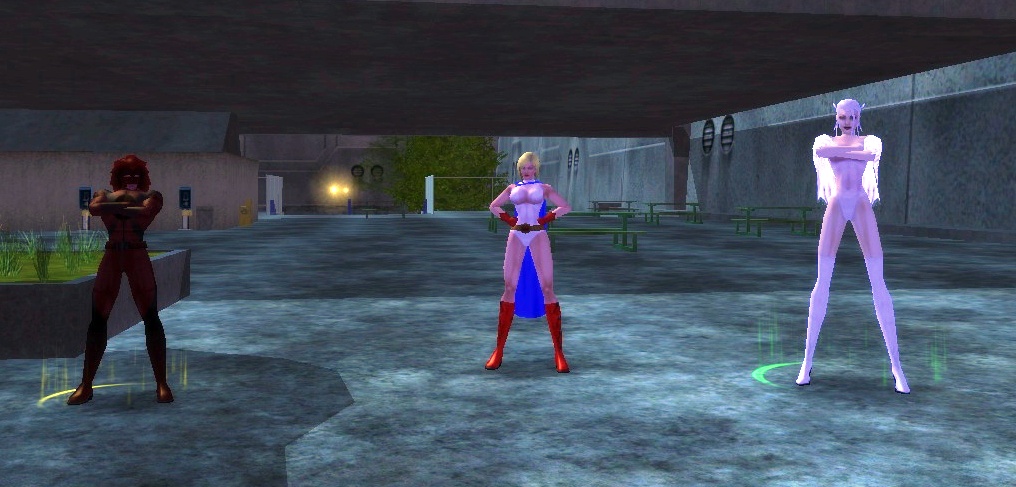
I'll one-up this. See the girl on the above image? That's a player-created character. The male character on the left of her is a non-player character (hence the yellow ring at his feet). Rather than having him just stand there giving out missions, why can't she team-up with him? He's got the experience.

When it comes to other players, City of Heroes has one-upped the original author's complaint with their super-sidekicking feature, which elevates or hinders all team members to the level needed for the mission. But how about bringing in those legendary heroes or villains to work WITH you?

On the plus side, DC Universe Online is supposed to allow you to work side-by-side with their legendary characters. I hope this will really be the case whenever they go live with it.

Now I DO have an issue that the author didn't mention...

(0) Dice-Roll

Okay, so my character has immobilized a thug. The thug cannot move. Why is it I cannot hit that thug each and every time from point-blank range if the thug cannot move?

The problem is that games like City of Heroes are still based on the old Dungeons-and-Dragons rules, which meant that you rolled dice and then your attack depended on chance. But the real world is not that random. If you immobilize a person, they cannot move. If you attack them at point-blank range, then you should ALWAYS be able to hit that person.

MMOPRGs have obviously grown from the days of the old Ultima game, and even from the original paper-and-dice incarnations, but clearly there is plenty of work that needs to be done before they can resemble the intricacies of the real world.

Friday, August 07, 2009

A Blast From the Past

How times have changed!

Once upon a time this USED to be the hottest thing on the market. This was before the days of the Macintosh and back when Microsoft was just another version of the DOS operating system.

Ladies and gentlemen, I give you the hottest thing in 1988... the COMMODORE AMIGA.


And under $1000 back then? That WAS cheap!

Thursday, April 09, 2009

Sunday, January 25, 2009

Mac at 25: Has it really been that long?

Has it really been twenty-five years ago that I was playing with a Mac? That I was writing articles and doing my reports on a Mac? That I thought that grayscale and lined textures were cool? That a little 3 1/2" square device could hold everything?
Seems more like 50. And btw, my new technolust is a Fujitsu Lifebook.